
Patient referral letter processingReferral letters read, matched to the patient and ready for triage
Patient referral letter processing with DocView reads the NHS number, patient name, date of birth, referrer, specialty and urgency, checks them and places each letter in the right triage queue. Dev Soft UK designs and builds this solution for your service with DocView Capture, DocView Web and DocView OmniRead.
Every referrer writes a different letter
Referrals come from many practices and services, by post and by e-mail, each in its own layout. Admin teams retype the patient's details into the booking system, look up the right record and pass the letter to the right specialty. An urgent letter can sit in an ordinary pile, and one wrong digit can file it against the wrong patient.
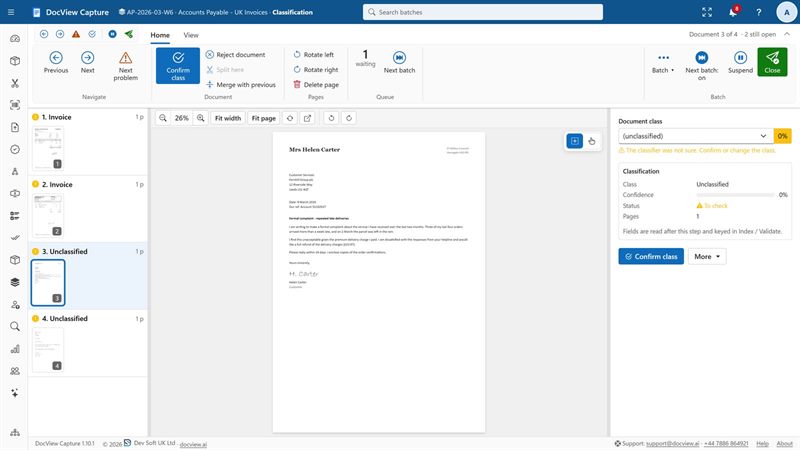
Receive
Letters are scanned from the post or collected from a shared mailbox or folder.
Read
NHS number, name, date of birth, referrer, practice, specialty and urgency are picked out.
Match
The patient is found in your patient index by NHS number, or by name and date of birth.
Queue
Each letter waits in the triage queue for its specialty, with urgent letters marked.
File
A searchable PDF and the index data go to your patient record or booking system.
Included in DocView
These are documented features of DocView Capture and DocView Web, ready to be set up for your letters.
Identifiers checked, letters sorted
- NHS numbers checked with the check digit, so a mistyped number is flagged
- A UK patient records setup indexed by NHS number, as a starting point
- Label and value finders that find details wherever each referrer prints them
- A classifier trained on your samples to tell referrals from clinic letters, discharge summaries and results
- Fuzzy lookup against your patient index, including sounds-alike matching on names
- Batch split by field value, so each specialty or urgency gets its own batch, step and priority
Strict access, every step recorded
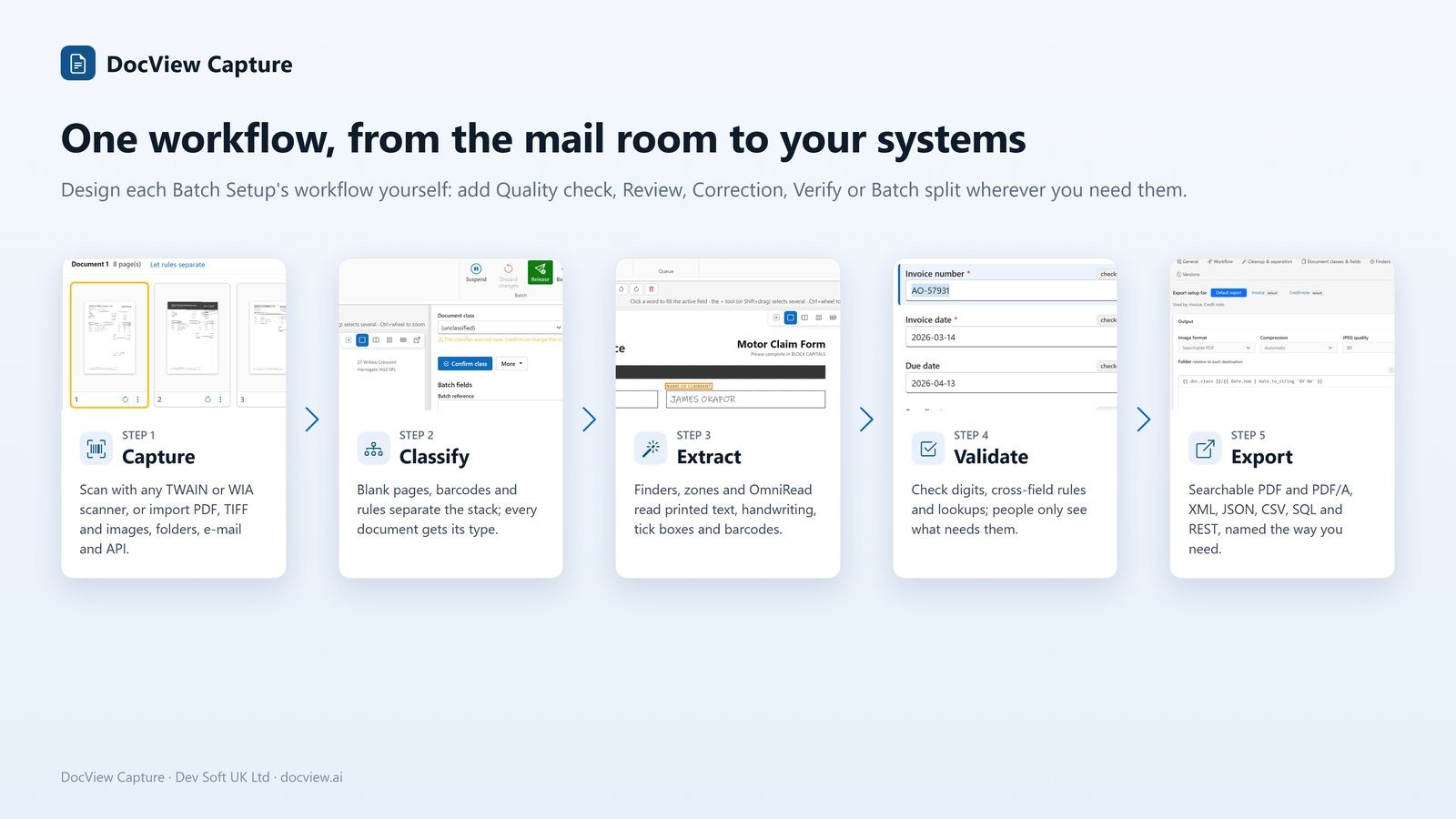
- Role-based permissions per module, operation and Batch Setup
- Departments kept apart, each with its own users, batches and search
- Correction at random, showing staff only the clip of the value being keyed
- An audit trail of every action and field change, with user and time
- Recognition on your own servers by default, with cloud services off until switched on
- Retention options for images after export
What we configure or build for you
DocView handles the paperwork around a referral. It does not make clinical decisions: triage and priority stay with your clinicians.
Your referral sources
We set up the fields and finders for the letters and referral printouts you actually receive, and test them on your own samples.
Triage queues
We create a queue per specialty and bring letters the referrer marked as urgent to the top. Clinicians can accept, return or ask for more in a DocView Web workflow.
Unmatched patients
We send letters with a missing or failed NHS number, or no clear match, to a named queue so a person confirms the patient.
Clinic letters and discharge summaries
We classify them, match them to the patient and file each one under the right document type.
Lab results filing
We match results to the patient and file them. Where the laboratory marks a result as abnormal, we can route it to be seen first.
Connection to your systems
We can connect DocView to your patient administration or electronic record system through the interface it offers, or deliver files and data it can import.
Admin teams that turn letters into appointments
Related paperwork, such as consent forms, care home admission packs and back-file patient records, can be set up in the same installation. See also DocView in healthcare.
Patient referral questions
Is this an off-the-shelf product?
No. It is DocView configured for your referral process and, where needed, extended by Dev Soft UK. Reading, checking and access control are part of DocView; your queues, matching rules and system connection are set up for you as a project.
Does DocView triage the referrals?
No. DocView reads the letter and puts it in the queue you define, using the urgency the referrer marked. The clinical decision about each referral is made by your clinicians.
What happens if the NHS number is missing or wrong?
A number that fails the check digit is flagged. We can look the patient up by name and date of birth, and any letter without a clear match waits for a person to confirm it.
Who can see the letters?
Only the people you allow. Permissions are set per module, operation and Batch Setup, departments are kept apart, and every action is recorded in the audit trail.
Where does it run?
On your own servers or in your own cloud, with recognition on your hardware by default, or hosted by us on Azure, AWS, Google Cloud or another provider of your choice. It is designed to help you meet your data protection obligations.
Talk to us about your referral letters
Tell us how referrals reach you today, or try the 14-day demo with fictional letters, never real patient data.