
Deployment and securityRun it where your documents are allowed to be
Let us host DocView Capture for you, or install it yourself on a PC, Windows Server, Docker, Azure, AWS or Google Cloud. Single sign-on, role-based access, four-eyes rules and an audit trail come with it.
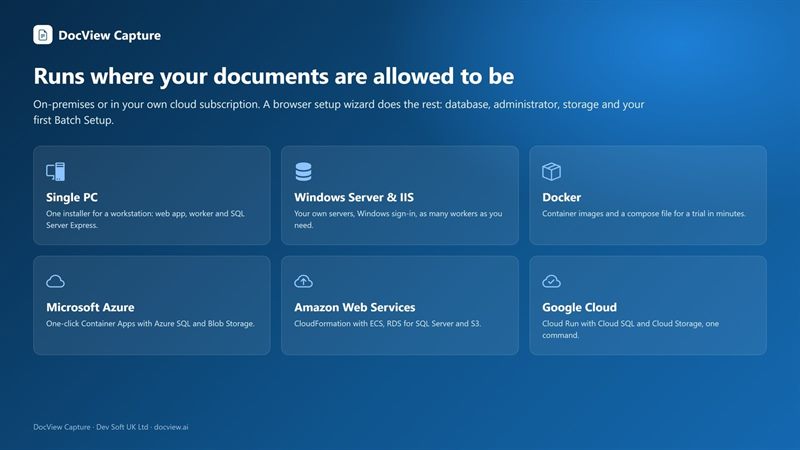
Hosted by us, or run it yourself
Hosted by us
Dev Soft UK hosts DocView Capture for you on Microsoft Azure, AWS, Google Cloud or another service provider of your choice. Your people use it in the browser, and scanning PCs need only the small Scan Agent. Hosting is quoted on your requirements and volumes.
Ask about hostingRun it yourself
Install it on your own PC or servers, in Docker, or in your own Azure, AWS or Google Cloud account, with one Setup program. Your documents stay on your servers or in your own subscription.
Try the live demo firstDeploy your way
Online and offline Setup versions are available. Setup finds an existing installation and updates it, keeping settings, documents and the database.
| Where | What you get |
|---|---|
| Windows PC | Web app and a DocView Worker as Windows services; SQL Server Express installed if needed. For trials, a small office or one scanning station. |
| Windows Server (IIS) | Web app as an IIS site with your host name and certificate; worker as a Windows service; IIS and prerequisites installed when missing. |
| Docker | Web app, workers and SQL Server Express in containers on Linux, macOS (Apple silicon or Intel) or Docker Desktop on Windows. |
| Microsoft Azure | Container Apps, Azure SQL and Blob Storage with managed identity, or install into resources you already have. |
| Amazon Web Services | ECS Fargate, RDS for SQL Server and S3 from one CloudFormation stack. |
| Google Cloud | Cloud Run, Cloud SQL for SQL Server and Cloud Storage. |
See the kinds of setup DocView Capture creates and how one installation can serve several organisations.
Your documents, your location
When you run DocView yourself, your documents stay on your servers or in your own cloud subscription, in the region you choose. With our hosted service, they are held with the cloud or service provider you choose. When you run it yourself, recognition uses your own hardware by default; cloud OCR and AI services are used only when an administrator switches a provider on with your organisation's own key.
Sign-in and access
- DocView passwords, Windows / Active Directory
- Single sign-on with Microsoft, Google, Apple or any OpenID Connect provider
- Role-based permissions per module, operation and Batch Setup
- Session control, sign-in history and IP allow/deny rules
Data protection
- Full audit trail of every action and field change
- Secrets encrypted at rest; API keys stored as salted hashes
- Four-eyes rules, double-key verification and second-person checks
- Correction at random so operators see only a value's clip
Retention and custody
- Configurable retention for batches, images and personal data
- Append-only chain-of-custody history
- Retention with numbered destruction certificates
- Regular security reviews and hardening
DocView is designed to help you meet data protection obligations such as UK GDPR and EU GDPR: audit trail, retention rules, role-based access, four-eyes checks, on-premises processing, and features for data subject access requests.
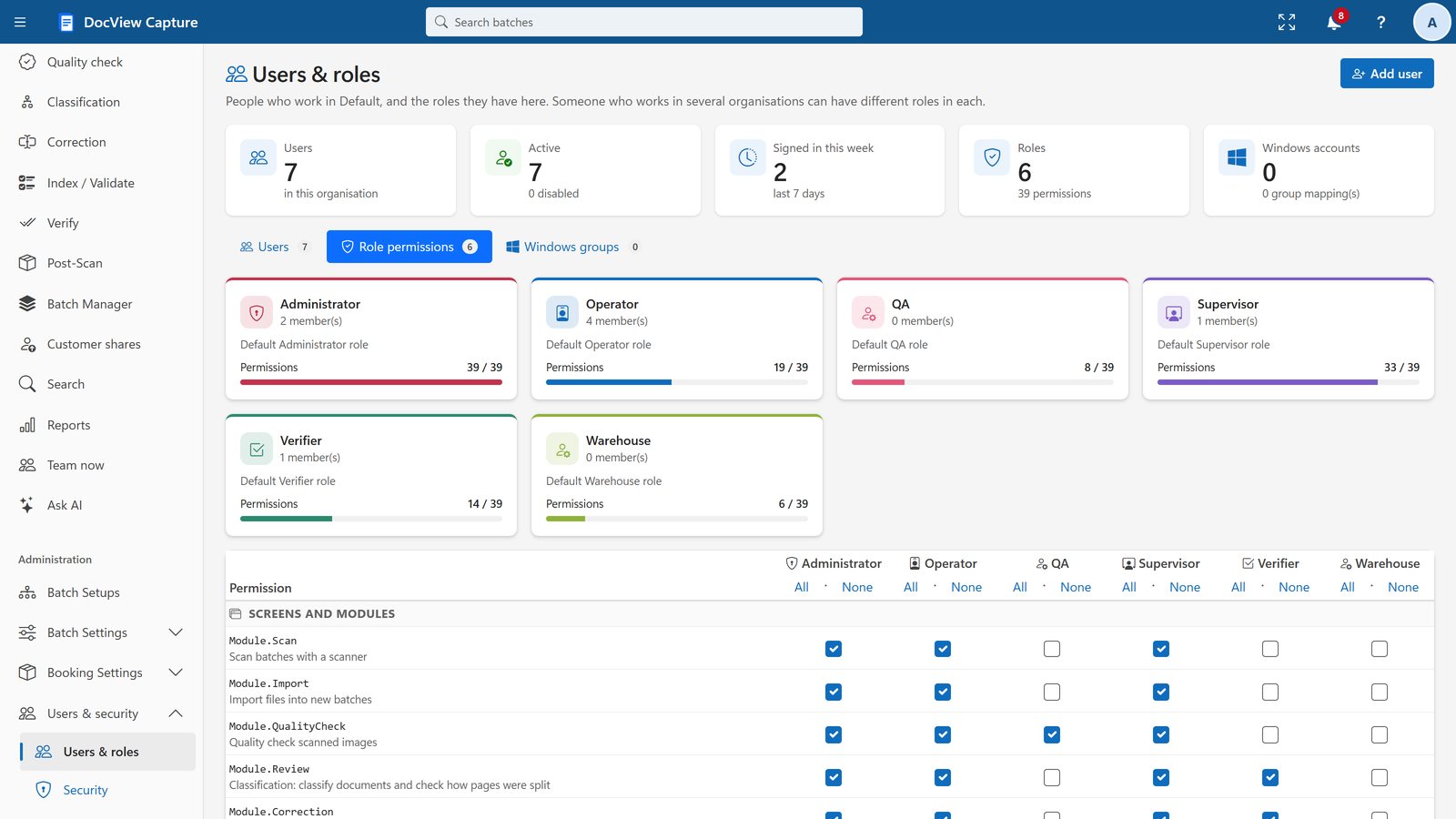
Permissions per module, operation and Batch Setup
Role-based permissions are set on one grid. Site administrators see every Worker, its status and its upgrades, and the audit log records every change.
What you need
Single workstation
Windows 10 or 11 (64-bit), 4+ cores, 8 GB RAM (16 GB recommended), SQL Server Express (installed for you).
Server
Windows Server 2019 or later with IIS 10; SQL Server 2019 or later. A TLS certificate is needed for scanning from other PCs.
Docker and cloud
Docker Desktop or Docker Engine with Compose, or your Azure, AWS or Google Cloud account.
Users
Scanning PCs: Windows with a TWAIN or WIA driver, no admin rights needed. Everyone else: a modern web browser.
Before you ask
Where are my documents stored?
Document data is kept in Microsoft SQL Server and page images in a folder, file share, Azure Blob Storage, Amazon S3 or Google Cloud Storage, on your servers or in your own cloud account, in the region you choose. With our hosted service, your documents are held with the cloud or service provider you choose.
Can you host DocView Capture for us?
Yes. Dev Soft UK can host it for you on Microsoft Azure, AWS, Google Cloud or another service provider of your choice. The cost is extra to the software licence and depends on your requirements and document volumes. Contact sales@docview.ai for a quote.
Does DocView send pages to the cloud?
Only if you choose. When you run it yourself, recognition uses your own hardware by default. Cloud OCR and AI services are used only when an administrator switches a provider on with your own key.
Does DocView support single sign-on?
Yes: Microsoft Entra ID / Microsoft 365, Google, Apple, any OpenID Connect provider, and Windows / Active Directory.
Can it scale?
Yes. Add DocView Workers and recognition services; they share the work queue safely. In the clouds, a number in the template scales them.
Run it where your data belongs
Try the online demo now, then talk to us about hosting DocView on our side or installing it on your servers or in your cloud.