
Medical records scanningPaper patient notes, turned into a digital record you can find
Medical records scanning with DocView takes shelves of paper patient notes through preparation, scanning and indexing by NHS number, keeps track of every box until the paper is returned or destroyed, then files new paper the same way. Dev Soft UK designs and builds this solution for you with DocView Capture, DocView Web and DocView OmniRead.
The record room is full, and the notes are needed somewhere else
Paper notes take up rooms that could be used for patients. A clinician in another building waits for a folder to be fetched, and a request for copies means someone photocopying page by page. The folders themselves are hard to scan: years of letters, handwritten notes on cards of different sizes, carbon copies, results stuck to backing sheets and the odd item that should not be there at all.
Two jobs, not one
The back-file is a project with a start and an end. Day-forward scanning is the routine that stops a new paper record from growing.
From the shelf to the digital record
Book the boxes in
Each box is received, labelled and given a place, so nothing is unaccounted for.
Prepare each record
Staples and tags come off, small cards are mounted, and a header sheet starts each patient.
Scan and clean up
Pages are scanned, straightened and cleaned, with faint and carbon copies given their own profile.
Split and sort
Each record is split into documents, and each document gets its type.
Index and check
NHS number, name and date of birth are checked, and doubtful values go to a person.
Deliver and dispose
PDFs and index data are delivered, and the paper is held, returned or destroyed on authorisation.
Included in DocView
These are documented features of DocView Capture and DocView Web. We set them up for your records and your project.
Reading and indexing
- A UK patient records setup indexed by NHS number, with check-digit validation
- Header sheets, barcode and patch code separators, removed automatically after use
- Clean-up profiles for carbon copies, faint text and pencil, with a before-and-after test
- Classification by rules or a classifier trained on your own records, with uncertain documents sent for review
- Fuzzy lookup against your patient index, so a name or date read with a slip still finds the right patient
- Searchable PDF or PDF/A, with file and folder names built from NHS number and document type
Every box accounted for
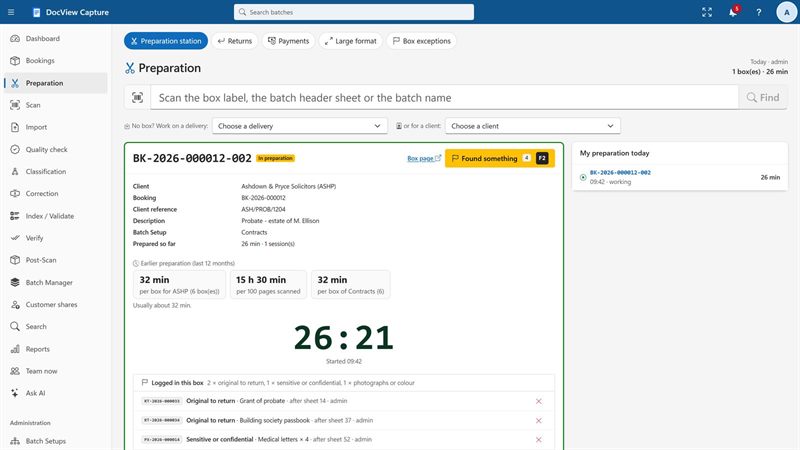
- Box booking, a preparation station with a timer, and "Found something" to log loose or unexpected items
- Slip sheets for large-format items, so the scan shows where they belong
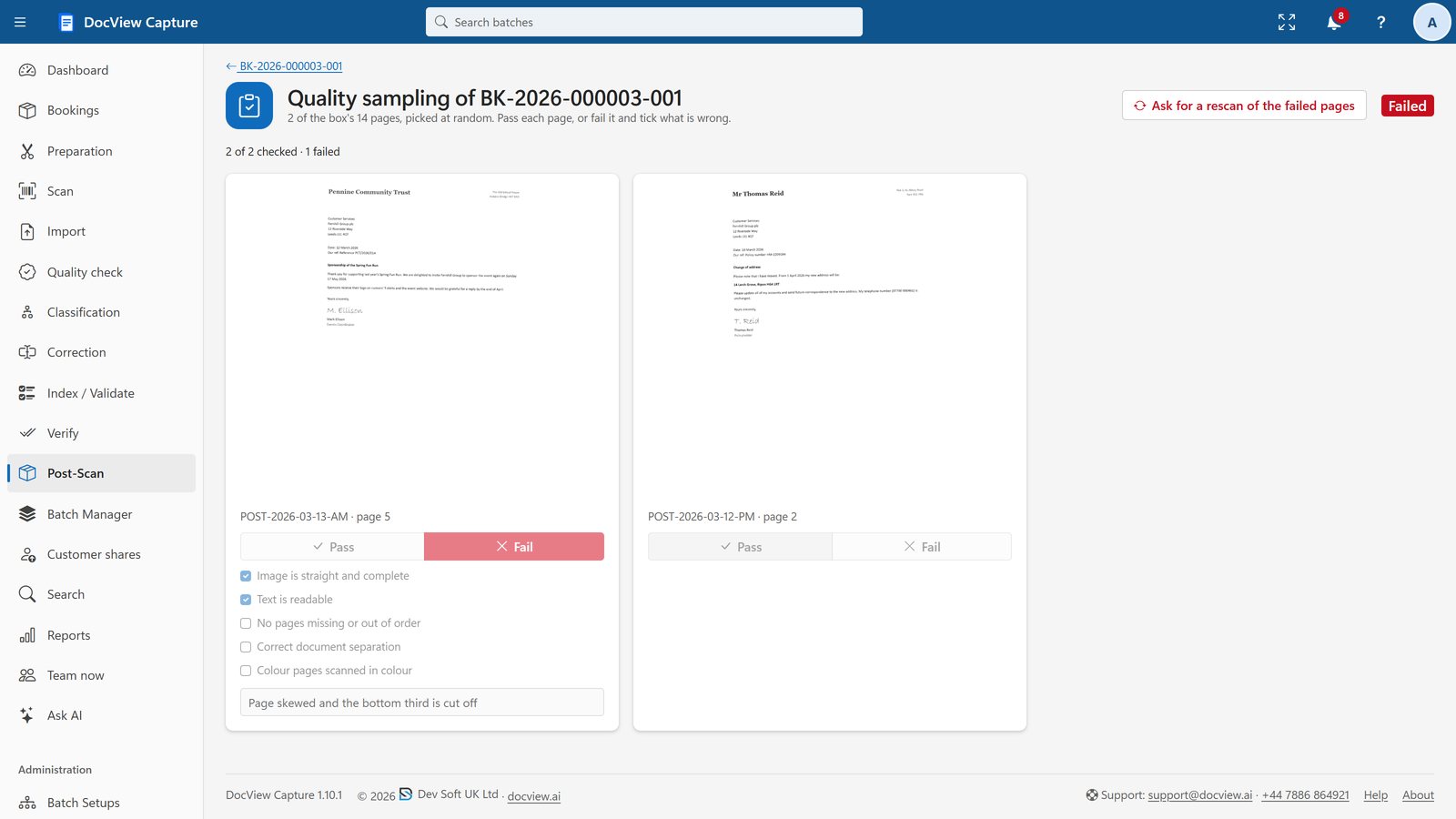
- Scan reconciliation of sheet counts and random quality sampling before a box is verified
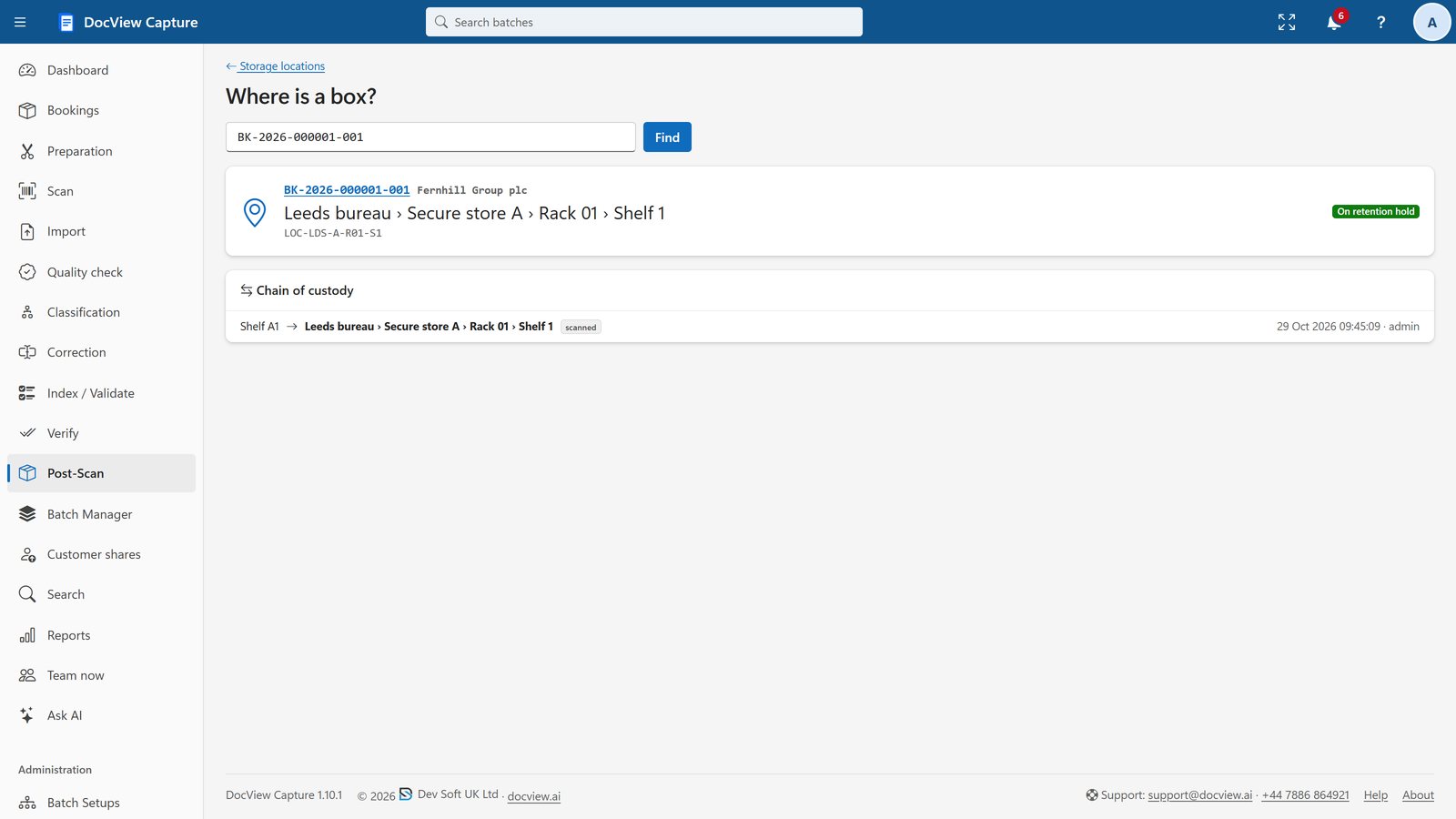
- Storage locations by site, zone, rack and shelf, with an append-only custody history
- Retention with authorisation and a numbered Certificate of Destruction
- Role permissions per Batch Setup, departments kept apart, and correction at random that shows only the value's clip
What we configure or build for you
DocView handles the paper and the index data. It does not interpret clinical content, and what goes into the record stays your decision.
Your document types
We agree the sections of the record with you, such as correspondence, results, clinical notes and forms, and set up how each one is recognised and named.
Restricted sections
We set up sensitive parts of a record as separate document types that only named roles can open, in DocView Capture and in DocView Web.
Records without a clear match
We send records with a missing or failed NHS number, or more than one possible patient, to a named queue so a person confirms the match.
Urgent requests during the project
We configure a route for a record needed before its box is due, so it is found on the shelf, scanned first and delivered.
Day-forward filing
After the back-file, we set up new letters and forms, scanned or collected from a mailbox or folder, to land in the same patient record.
Your record system
We can connect DocView to your patient administration or electronic record system through the interface it offers, or deliver files and index data it can import.
Anyone holding paper patient notes
For incoming referral letters and triage queues, see patient referral processing. For the wider picture, see DocView in healthcare, and bureaus running records projects for clients will find the box handling on scanning bureaus.
Medical records scanning questions
Is this an off-the-shelf product?
No. It is DocView Capture, DocView Web and DocView OmniRead, configured by Dev Soft UK for your records and, where needed, extended with work we build for your project. Box handling, separation, the patient records setup and access control exist today; your document types, matching rules and system connection are set up for you.
Can we scan the records ourselves, or does a bureau do it?
Either. DocView Capture runs the same way for an in-house team or a scanning bureau, and a bureau can give you a tracking link to follow the progress of each box.
How are odd-sized cards and loose items handled?
Preparation staff can log anything unexpected with "Found something" without losing their place, and large-format items get a slip sheet so the scan shows where they belong. Scan profiles set paper size, colour and duplex.
What happens to the paper afterwards?
Each box keeps a custody history from booking to return or destruction. Destruction needs authorisation and produces a numbered Certificate of Destruction.
Will this meet our health records obligations for us?
We make no compliance claim. Role-based access, an audit trail of every change, retention rules and on-premises recognition are designed to help you meet your own data protection and records management obligations.
Plan your medical records scanning project
Tell us how many records you hold and where they need to end up, or try the 14-day demo with fictional documents, never real patient data.